

Security tip: No genuine bank or mobile money provider will ever ask for your PIN or one-time password.
A woman carefully checking a message on her phone at home

Think before you trust.

ScamProtect

Scam protection for
your calls and SMS.

ScamProtect checks the messages and calls you receive, warns you before you reply, pay or pick up, and lets you block and report scammers in a tap.

For Android · Built by Spectre Creation, Botswana · Independent, not a government service

Warned before you act

Suspicious messages and calls are flagged before you reply, pay or share details.

Clear reasons, not just a score

Every rating explains which warning signs it found.

Stronger together

Each report warns everyone else who gets the same number.

Inside ScamProtect

One app for your messages, calls and links.

From a fake "you've won" SMS to a caller pretending to be your bank, see how ScamProtect helps you spot it.

Not sure about a message? Check it first.

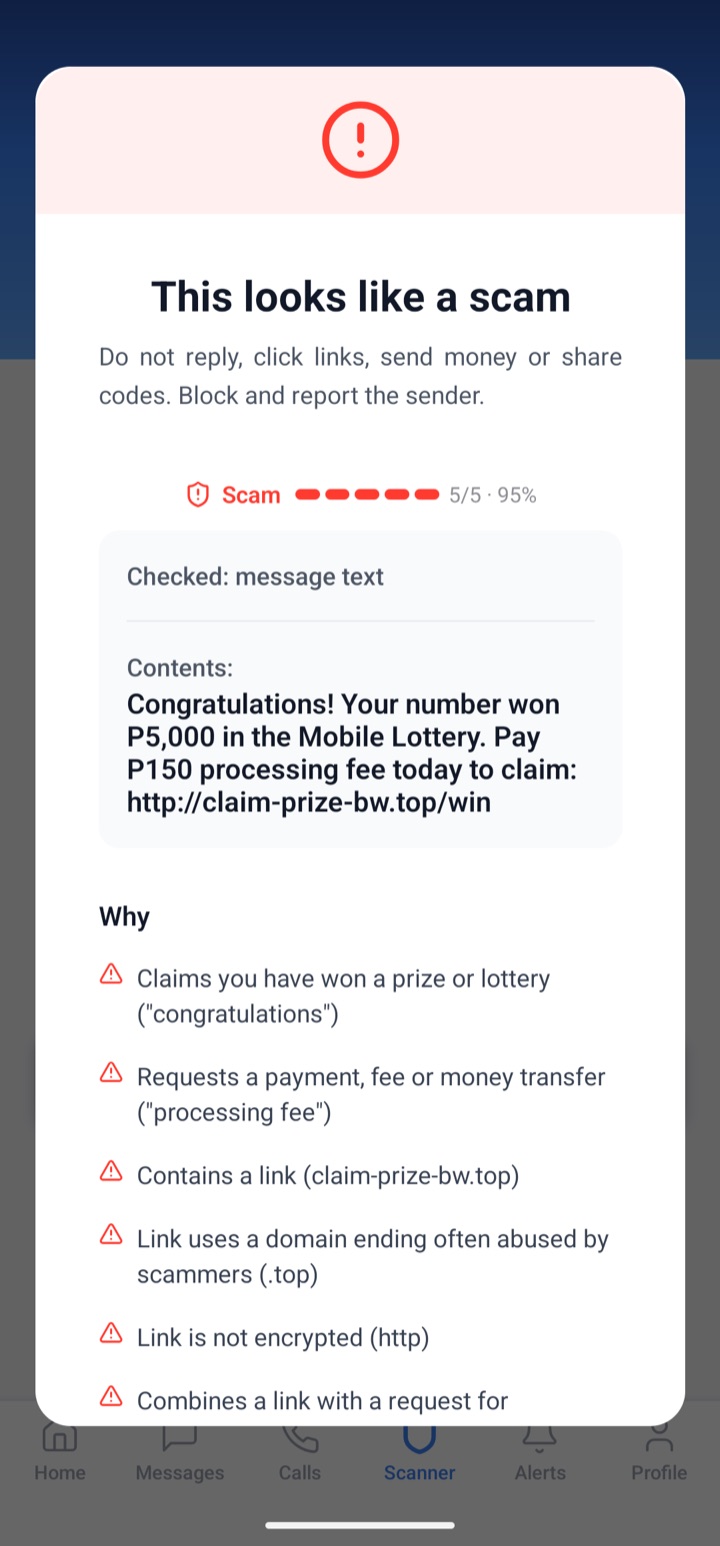
Paste a message, phone number or link into the Scanner. ScamProtect rates it from 1 (safe) to 5 (scam) and tells you exactly why.

  • Spots prize offers, loan offers and requests for your PIN
  • Flags links that hide where they go
  • Tells you what to do next
See how to use it

Screenshots from ScamProtect for Android. The numbers and messages shown are test data. Ratings are guidance, not a guarantee.

Scan result rating a prize message 5 out of 5, a scam, and listing the reasons

I want to…

How Can We Help You Today?

What ScamProtect does

Designed for the Threats You Face Every Day

The scams that reach you by SMS and phone call, caught in one app.

SMS Scam Ratings

Every incoming SMS is rated from 1 (safe) to 5 (scam), with the reasons listed: hidden links, requests for PINs or money, fake prizes and impersonation.

Call Screening

Recent callers are labelled as spam or scam. When ScamProtect screens your calls, blocked numbers are rejected before they ring.

Scanner

Check a phone number, an SMS, a link or any text yourself before you reply, call back or tap.

Block and Auto-block

Block a number from a conversation, the Calls tab or a scan report, or let ScamProtect block senders rated as scams.

Community Reports

Report a number as spam or a scam. The more people report it, the stronger the warning everyone else sees.

Works Offline

Without a connection, messages are checked with rules on your phone, then sent for a full check when you're back online.

Ratings are risk indicators and guidance — not an absolute guarantee that something is safe or fraudulent. Always use your judgement and verify through official channels.

How it works

Your First Line of Defence Against Digital Scams

  1. 01

    Install

    Download ScamProtect from Google Play on your Android phone and open it.

  2. 02

    Choose your protection

    Make it your SMS app for ratings inside conversations and call screening, or keep your current SMS app with Custom Mode.

  3. 03

    Get warned

    Incoming messages and calls are checked as they arrive. Suspicious ones get a rating, the reasons and a warning.

  4. 04

    Block and report

    Block scammers in one tap and report them, so other people are warned about the same number.

Scam alerts

Stay Ahead of Emerging Scams

Demonstration content — these sample alerts illustrate the format and are not verified incidents.
High riskSMS

Mobile Money Scams

Fake 'wrong transfer' SMS followed by reversal calls

Messages imitating wallet deposit notifications, followed by callers asking for the money back.

What to do: Check your balance in the official app before acting.

Read more
High riskWhatsApp

WhatsApp Scams

WhatsApp verification code requests from contacts

Hijacked accounts asking friends to forward a 6-digit code.

What to do: Never forward codes. Enable two-step verification.

Read more
Medium riskEmail

Phishing Scams

Courier fee phishing emails

Emails claiming a parcel is held pending a small payment.

What to do: Track parcels only on the courier's official site.

Read more

Threat insights

Understanding the Digital Threat Landscape

Figures are published only once they're verified. Until then, they appear as pending.

—

Reported suspicious activities

Awaiting verified data

—

Threats analysed

Awaiting verified data

12

Scam categories tracked

—

Emerging threat alerts

Awaiting verified data

Before you get started

A Clearer Picture of ScamProtect

Where can I get ScamProtect?

ScamProtect is for Android phones (Android 7.0 or later). It is coming soon to Google Play; this page will link to it as soon as it is available. There is no iPhone version: the SMS and call protection is built for Android.

What happens to my messages?

To rate a message or call, its text and the sender's number are sent to our checking service and kept in your protection history, so you can see past ratings. Our Privacy Policy explains how that data is handled.

Does ScamProtect guarantee that something is safe?

No. Ratings help you make an informed decision but cannot catch every scam or confirm that something is genuine. Always verify payments, requests and account details through official channels.

Do I have to make ScamProtect my SMS app?

No, but it is recommended. As your SMS app it shows the rating under each message and turns a scam's notification into a warning. If you'd rather keep your current SMS app, choose Custom Mode: incoming messages are still checked.

Digital Protection for Every Part of Your Life

Individuals

Build confidence around suspicious messages, numbers and links, and learn the warning signs of everyday scams.

Families

Help children, parents and elderly relatives recognise scams, and set ScamProtect up on their phones.

Businesses

Protect staff and payments from invoice fraud, impersonation and phishing with awareness resources.

Stay Alert. Stay Protected. Stay Ahead.

Put a second opinion on every SMS and call. Get ScamProtect for your Android phone.